 Neel Thakkar


Artificial intelligence is changing how businesses approach software development, application management, and digital transformation. AI-powered tools are helping teams understand complex systems, simplify repetitive tasks, and explore new ways to improve their workflows. One such tool is Claude Code, an AI-powered coding assistant developed by Anthropic that helps users understand project files, generate code, and assist with development tasks. Salesforce's official Development Plugin also brings Salesforce-specific guidance and workflows into the Claude Code experience.
For the Salesforce ecosystem, Claude Code introduces new opportunities to support development activities, simplify project maintenance, and improve collaboration between technical and business teams. However, adopting AI tools also raises important questions about code accuracy, security, and the need for human oversight. Understanding both the benefits and limitations is essential before integrating these tools into existing workflows. In this blog, we will explore how Claude Code can be used in Salesforce projects, its potential benefits, its limitations, and what organizations should consider before adopting it.
What Is Claude Code and How Does It Work?

- Claude Code is an AI-powered coding tool that helps users work with software projects through natural-language instructions.
- It can explain existing code, suggest improvements, investigate issues, and assist with development tasks.
- For Salesforce projects, teams can use Claude Code to understand existing customizations, review Apex classes, and prepare initial test classes.
- Its capabilities depend on the available project files, permissions, configured tools, and installed extensions.
How Does Claude Code Fit into Salesforce?
- Salesforce provides an official Development Plugin for Claude Code that offers Salesforce-specific guidance, tools, and development workflows.
- Depending on the configuration, it can assist with Apex development, Salesforce metadata, testing, and other development activities.
- Teams can describe a requirement, review relevant project files, and ask Claude Code to explain existing functionality or suggest possible changes.
- Developers and other responsible team members must review the suggestions, validate the results through appropriate testing, and follow established approval and deployment processes.
- Claude Code does not automatically understand every Salesforce configuration or business requirement, so human expertise and oversight remain essential.
How Can Claude Code Be Used in Salesforce Projects?
Claude Code can support different activities within Salesforce projects, from understanding existing customizations to assisting with testing and documentation. Its relevance extends beyond writing code because Salesforce projects also involve requirements, maintenance, collaboration, and quality assurance.
Here are six ways it may support Salesforce teams.

Understanding Existing Salesforce Customizations
- Salesforce organizations often use customizations such as Apex classes, Lightning Web Components (LWC), Flows, integrations, and metadata to support their business processes.
- Understanding how these components work together can be challenging when teams take over an existing project.
- Claude Code can help explain project files, summarize code logic, and identify potential relationships between components.
- Salesforce consultants can use these explanations to understand existing implementations, prepare questions, and discuss potential changes with development teams.
- Teams should verify the information against the actual Salesforce configuration and business requirements.
Supporting Salesforce Development and Customization
- Salesforce projects may require custom functionality beyond standard platform configuration, including Apex logic and LWC components.
- Claude Code can help explain existing code, suggest implementation approaches, and prepare initial code based on the requirements provided.
- For example, a developer could use Claude Code to explore how to build a custom interface that displays relevant account information.
- Developers must review the suggested solution to ensure it meets business requirements and follows Salesforce best practices.
- Claude Code can provide a starting point for development tasks, but it does not automatically complete every customization correctly.
Helping Teams Investigate Issues
- Salesforce teams may encounter errors, unexpected application behavior, or problems after making changes to an existing customization.
- Investigating these issues may require reviewing code, configuration, error messages, and related dependencies.
- Claude Code can help analyze available technical information, suggest possible causes, and identify areas that need further investigation.
- For example, teams can use it to examine relevant files and explore why a Salesforce process stopped working after a code change.
- Teams must reproduce the issue, confirm the root cause, and test proposed fixes before applying them.
Assisting with Testing and Quality Checks
- Testing helps Salesforce teams confirm that applications work correctly and that new changes do not affect existing functionality.
- Claude Code can assist with drafting Apex test classes, suggesting test scenarios, and identifying potential gaps in test coverage.
- For example, when modifying an opportunity-processing customization, teams can ask it to suggest tests for valid records, missing information, and unexpected inputs.
- These suggestions can help teams consider different scenarios before validating the implementation.
- Developers must ensure that the tests reflect business requirements, execute successfully, and verify the expected results.
Supporting Technical Documentation
- Salesforce documentation helps administrators, consultants, developers, and architects understand how an implementation works.
- Claude Code can help draft technical explanations, summarize code changes, and prepare documentation using the available project information.
- This can be useful when maintaining existing applications, onboarding new team members, or communicating changes to stakeholders.
- Consultants and technical teams can review the generated documentation to make complex information easier to understand.
- AI-generated documentation must be checked for accuracy and should reflect the actual implementation.
Improving Collaboration Between Technical and Business Teams
- Salesforce projects often involve business stakeholders who define requirements and technical teams who implement solutions.
- Claude Code can help explain technical concepts and summarize customizations in simpler language.
- For example, a consultant could use it to prepare an explanation of how a customization supports a business process before discussing it with stakeholders.
- These explanations may help teams prepare for discussions and communicate technical information more clearly.
- However, AI assistance does not replace direct collaboration between business stakeholders, consultants, and technical specialists.
What Are the Benefits of Claude Code for Salesforce Teams and Businesses?
The potential benefits of Claude Code are not limited to developers. Depending on how it is introduced, it may also support consultants, project teams, and organizations responsible for maintaining Salesforce applications.
1. More Efficient Development Workflows
- Salesforce teams often spend time preparing code drafts, explaining existing logic, and creating technical documentation.
- Claude Code can assist with these repetitive activities and help teams prepare initial outputs more efficiently.
- This may reduce manual effort for selected tasks, depending on the complexity of the work and the accuracy of the generated results.
- Teams should evaluate the time saved after accounting for review, testing, and corrections.
2. Easier Access to Technical Explanations
- Salesforce projects can involve complex customizations that are difficult to understand without prior experience.
- Claude Code can help explain unfamiliar code and summarize technical information in simpler language.
- Consultants and administrators can use these explanations to prepare for discussions with developers and architects.
- Teams should verify important technical explanations before using them to make implementation decisions.
3. Support for Project Maintenance
- Maintaining Salesforce applications often involves understanding existing customizations, investigating unexpected behavior, and reviewing previous changes.
- Claude Code can help analyze relevant project files and summarize how selected parts of an implementation work.
- This can help team members become familiar with existing projects and understand potential areas that need attention.
- Its suggestions should be checked against the actual Salesforce environment and business requirements.
4. Assistance with Testing and Documentation
- Testing and documentation are essential activities that can require considerable time during Salesforce projects.
- Claude Code can help prepare test scenarios, draft technical notes, and summarize code changes.
- These suggestions can provide a starting point for teams to improve their testing and documentation workflows.
- Team members must review the generated content to ensure accuracy, completeness, and alignment with project requirements.
5. Opportunities to Improve Team Productivity
- Claude Code can assist with selected coding, analysis, troubleshooting, and documentation tasks across Salesforce projects.
- By supporting these activities, it may help teams allocate more time to complex problems and important business requirements.
- The actual productivity benefits depend on the project, available tools, task complexity, and amount of human review required.
- Organizations should start with clearly defined tasks, measure the results, and expand adoption when the benefits are demonstrated.
Claude Code vs. Traditional Salesforce Development: What's the Difference?
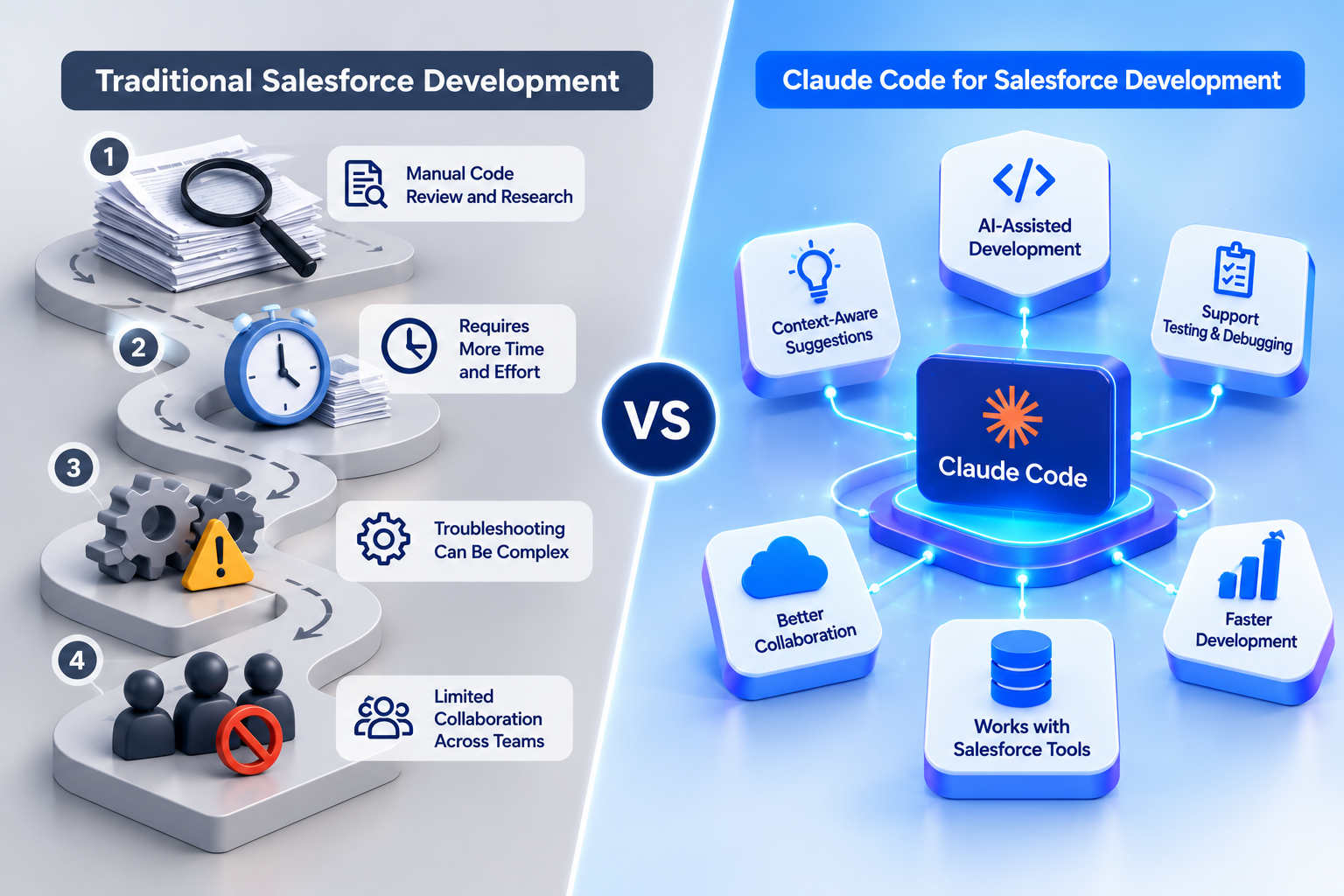
- Traditional Salesforce development involves developers and technical teams analyzing requirements, writing code, testing functionality, and maintaining applications using established development practices.
- Claude Code introduces AI assistance into selected development activities by helping teams draft code, understand project files, investigate issues, and prepare documentation.
- In traditional development, developers write and modify code directly, while Claude Code can help generate initial code drafts and suggest improvements.
- Teams traditionally inspect project files and documentation to understand existing customizations, while Claude Code can help explain relevant files and summarize code logic.
- Developers investigate errors using their expertise and development tools, while Claude Code can suggest possible causes and areas that require further investigation.
- Teams design and execute tests using established methods, while Claude Code can assist with preparing test scenarios and drafting test code for review.
- Team members create and maintain technical documentation, while Claude Code can help draft explanations and summarize project changes.
- Teams remain responsible for evaluating requirements and selecting appropriate solutions, even when Claude Code assists with analysis or development tasks.
Does Claude Code Replace Traditional Salesforce Development?
- Claude Code is an additional tool that can support selected Salesforce development activities rather than replace established development practices.
- Salesforce expertise remains essential for understanding business requirements, evaluating architecture, validating functionality, and maintaining application security.
- Organizations should identify where AI assistance can improve their workflows while maintaining code quality, human oversight, and established development standards.
What Are the Limitations of Claude Code in Salesforce?
Although Claude Code offers opportunities for AI-assisted work, Salesforce teams should understand its limitations before relying on it in business-critical projects.
1. AI-Generated Results May Be Incorrect
- Claude Code can generate code or explanations that contain errors or overlook important business requirements.
- A suggested solution may work in a simple scenario but fail with unusual record types, complex business rules, or large data volumes.
- Developers and technical reviewers must validate AI-generated changes against Salesforce requirements and actual application behavior.
2. Business and Configuration Context May Be Missing
- Salesforce implementations involve more than code, including permissions, metadata, Flows, integrations, data relationships, and business rules.
- If Claude Code cannot access the necessary project information, its suggestions may not match the actual Salesforce environment.
- The Salesforce Development Plugin provides platform-specific guidance and workflows, but available capabilities depend on the configuration, permissions, and connected tools.
- Teams must verify that proposed solutions align with their existing implementation and business requirements.
3. Human Expertise Remains Essential
- AI assistance does not replace Salesforce knowledge, architectural judgment, or an understanding of business processes.
- Developers must evaluate proposed solutions, while architects assess system design and dependencies.
- Administrators and consultants must ensure that the suggested changes meet business requirements.
- AI-generated output should be treated as a recommendation that requires review and approval, not as a ready-to-use solution.
4. Security and Data Privacy Need Attention
- Salesforce environments may contain sensitive customer information, business records, credentials, and other confidential data.
- Organizations should review access permissions, data-handling practices, connected tools, and privacy policies before adopting Claude Code.
- Teams should also review the official plugin documentation for relevant telemetry and privacy considerations.
- Sensitive information and credentials should be protected, and AI tools should be used within approved environments with appropriate access controls.
5. Additional Setup May Be Necessary
- Using Claude Code for Salesforce-specific workflows may require appropriate software, Salesforce CLI, project files, plugin configuration, connected environments, and suitable permissions or licenses.
- The exact requirements depend on the intended workflow and the tools being used.
- Organizations should review Salesforce's official setup documentation and verify the requirements before implementation.
Overall, Claude Code can assist with selected Salesforce tasks, but teams must evaluate its output carefully and follow their established security, testing, and development standards.
What Should Salesforce Teams Consider Before Adopting Claude Code?
- Salesforce teams should identify suitable tasks for Claude Code, such as understanding existing customizations, preparing documentation, or drafting test scenarios.
- Organizations should begin with small, clearly defined tasks that can be reviewed easily before using AI assistance in more complex projects.
- Teams should provide clear instructions, business requirements, and relevant context to help Claude Code generate more useful suggestions.
- Organizations should review access permissions, data-handling practices, privacy requirements, and connected tools before introducing Claude Code into their workflows.
- AI-generated code and recommendations should be reviewed, tested, and validated against Salesforce requirements before implementation.
- Teams should continue following established security practices, version control procedures, code reviews, and deployment standards when using AI assistance.
- Organizations should measure the time saved, amount of manual correction required, output quality, and testing effort to evaluate the tool's effectiveness.
- Salesforce teams should expand their use of Claude Code gradually when the results demonstrate practical value without compromising application quality, security, or business requirements.
- Salesforce teams should check whether Claude Code supports their existing development tools, project structure, and preferred working methods before introducing it into daily operations.
- Organizations should define clear guidelines for when AI assistance is appropriate and when tasks require direct input from experienced Salesforce professionals.
- Teams should ensure that employees understand how to write clear prompts, review AI-generated suggestions, and recognize potential errors or missing information.
- Businesses should consider the learning curve and additional setup effort required to integrate Claude Code into existing Salesforce development workflows.
- Organizations should establish accountability by defining who reviews, approves, and validates AI-assisted changes before they are implemented in Salesforce.
- Teams should regularly review their experience with Claude Code and update their guidelines as project requirements, security needs, and AI capabilities evolve.
How Can Organizations Get Started with Claude Code?
Organizations interested in Claude Code can begin with a controlled evaluation rather than introducing it across every Salesforce project immediately.
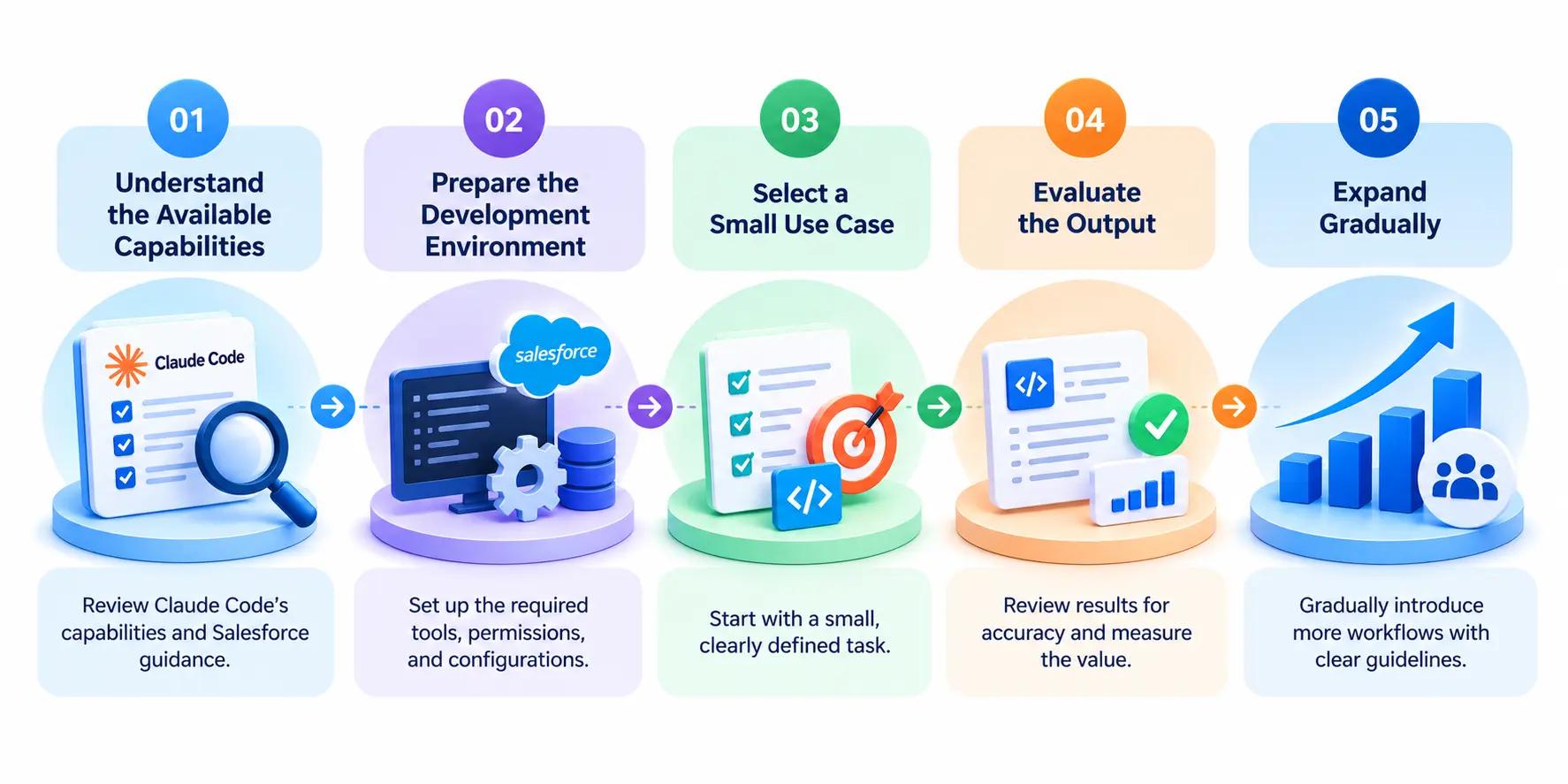
Step 1: Understand the Available Capabilities
- Review Claude Code's current capabilities to understand how it can support different software development activities.
- Explore Salesforce's official Development Plugin documentation to learn about Salesforce-specific guidance and available workflows.
- Identify the capabilities that align with the organization's project requirements and business goals.
- Discuss with Salesforce developers, consultants, and architects how AI assistance could support existing workflows.
- Refer to the Salesforce Development Plugin documentation for official setup and capability information.
Step 2: Prepare the Development Environment
- Confirm that the organization has the necessary tools, licenses, project files, permissions, and configurations for the selected workflow.
- Check whether the existing Salesforce development environment is compatible with the intended Claude Code setup.
- Establish appropriate access controls before connecting AI tools to project files or development environments.
- Ensure that employees understand the organization's data privacy, security, and access policies before using the tool.
- Verify that the required configurations and permissions are in place before starting the evaluation.
Step 3: Select a Small Use Case
- Choose a clearly defined task, such as explaining an existing customization, reviewing a code change, or preparing technical documentation.
- Select a task that can be completed and evaluated without making significant changes to critical business processes.
- Start with a workflow that allows team members to review the results and identify potential errors easily.
- Avoid beginning with high-risk production changes or tasks that require access to unnecessary sensitive information.
- Define the expected outcome before starting so the team can determine whether Claude Code provides practical value.
Step 4: Evaluate the Output
- Ask the appropriate team members to review the results for accuracy, relevance, security, and alignment with Salesforce requirements.
- Verify AI-generated suggestions against the actual project configuration, business requirements, and established development standards.
- Record the time spent completing the task, including the time required for reviewing, testing, and correcting the output.
- Compare the results with the organization's existing workflow to understand whether AI assistance improves efficiency or quality.
- Document any errors, limitations, or additional steps required to achieve the expected outcome.
- Use the evaluation findings to decide whether the workflow should be improved, continued, or discontinued.
Step 5: Expand Gradually
- Introduce additional workflows only after the initial evaluation demonstrates practical value.
- Establish clear guidelines explaining which tasks can use Claude Code and which require additional review or approval.
- Define responsibilities for reviewing, testing, and approving AI-assisted changes before implementation.
- Provide appropriate guidance to employees so they can use the tool effectively and recognize its limitations.
- Review the results regularly and update internal guidelines as project requirements, security needs, and AI capabilities evolve.
- Maintain existing quality checks, security controls, version control practices, and deployment procedures as adoption increases.
Salesforce administrators, consultants, architects, and business leaders do not all need to use Claude Code directly. Their involvement may instead focus on identifying suitable opportunities, defining business requirements, reviewing risks, and evaluating project outcomes. This helps organizations explore AI-assisted Salesforce development while maintaining appropriate oversight and accountability.
How Can Salesforce Teams Measure the Impact of Claude Code?
- Salesforce teams can evaluate Claude Code by measuring how effectively it supports selected development and project-related tasks.
- Teams can compare the time required to complete a task with and without AI assistance, including reviewing, testing, and correcting the results.
- Organizations can assess the quality of AI-generated suggestions by checking their accuracy, relevance, and alignment with business requirements.
- Developers can track whether Claude Code helps them understand existing customizations, investigate issues, or prepare documentation more efficiently.
- Salesforce consultants and administrators can evaluate whether AI-generated explanations make technical information easier to understand and communicate.
- Teams should monitor the amount of manual correction required to determine whether AI assistance reduces effort or introduces additional work.
- Organizations should also consider security, code quality, and testing requirements rather than evaluating success based on speed alone.
- Regularly reviewing these results can help businesses identify suitable use cases and decide whether Claude Code should become part of their established workflows.
Conclusion
Claude Code introduces new opportunities for Salesforce teams to support development, maintenance, testing, and documentation. Its capabilities can benefit not only developers but also consultants, administrators, architects, and business leaders who want to understand how AI can support Salesforce projects and improve team workflows.
However, successful adoption requires realistic expectations, appropriate configuration, careful data handling, and reliable review and testing processes. Organizations should begin with suitable use cases, evaluate the results in a controlled environment, and expand adoption when measurable benefits justify the effort. Ultimately, Claude Code can support Salesforce teams, but human expertise and informed decision-making remain essential for maintaining application quality, security, and business alignment.